

Showing posts with label Digital Art. Show all posts
Showing posts with label Digital Art. Show all posts
Saturday, August 11, 2012
Using the Crayola Site in the Primary Grades
On Wednesdays, special area teachers at Herrera cover two classes they may or may not normally have so that classroom teachers have the time to attend professional development sessions. This week I had Mrs. Diaz' first grade class and the students got a chance to share laptops to use the Crayola interactive painting and drawing website. The tools are exactly like you could purchase in real life but they do not dry out, break or wear down! In addition, students can have as many pieces of virtual paper as they want! This prepares them for using more sophisticated digital tools later on.


Getting to Know You Jr. High Wordles

As a getting to know you activity for my Jr. High Digital Art elective, I had the students make a list of their favorite things as a WORD document and then copy that into WORDLE. They were supposed to emphasize their name, use the snipping tool, and save to their folders. Additionally, they were to edit the color palette in WORDLE and place the design in their PowerPoint portfolio. (See Animoto below)
Tuesday, March 27, 2012
Salon Des Enfants 2012

Every spring, Phoenix Elementary art students exhibit at the Alwun House. I was lucky enough to teach a middle school elective geared towards creating finished pieces using methods chosen by me but using whatever subject matter they wanted. One of the techniques we all did was stippling. We watched a video called "Hero" on Vimeo which showed an artist stippling a portrait. (See Animoto below)
Saturday, February 18, 2012
Digital Color Theory

My color theory class not only had to learn how to mix tints, shades, secondary and intermediate colors using only primary colors, black and white, but they also had to transfer that knowledge to digital media. In the process they learned how to use Gimp layers, save to several formats, colorize using hue, saturation, and lightness sliders, and the rotation tool. (See Animoto below)
Friday, June 10, 2011
Friday, April 22, 2011
Jr. High Autobiographical Self Portraits

Students in the digital art class created layered self portraits using a photo cutout of themselves on a transparent background. Subsequent layers were a famous work of art and then four layers depicting special interests. Here are the first ones completed.

Sunday, April 3, 2011
Jr. High Color Wheel Portraits using Gimp

I love doing this project so all my digital art students do it. It teaches so many digital skills and tools that by the time they are done, they can do many projects using Gimp. If they are lucky enough to have access to Photoshop in the future, they are able to make the transition without any teaching. (See Animoto below)
Friday, January 14, 2011
Andy Warhol Revisited - Jr. High Digital Graphics

Sunday, January 9, 2011
Let's Make Some Bling; a Gimp Tutorial
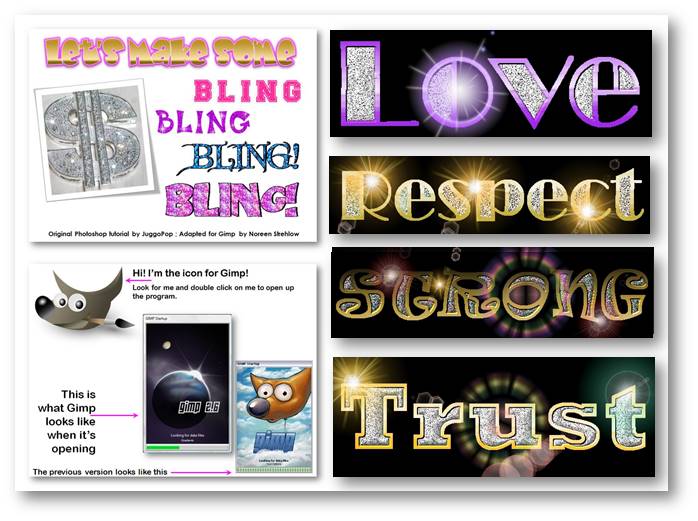
Although we couldn't afford Photoshop, I felt that students needed to learn digital graphic skills so I adapted a fun project using the open source program Gimp. I had done this with Ginger Baron's students at Lowell School and ACE students at Prep, so I knew it was a successful activity. By the time it was finished, kids knew a lot about graphic tools. (See video below)
Wednesday, August 18, 2010
Intro to Tux Paint

Normally this class is too large to use the 18 computers I have in my art room. Today I got to take 1st and 2nd graders separately so all students got to explore the program Tux Paint. It is an open source (Free!!) piece of software and is comparable to the old Kid Pix in many ways. Students should always have at least two class periods for pure exploration before moving towards what most people call projects. This is true of most mediums even software. (See video below)
Subscribe to:
Posts (Atom)